
SmartDSP – DirScope:
Folder Size Explorer/Disk Space Analyzer
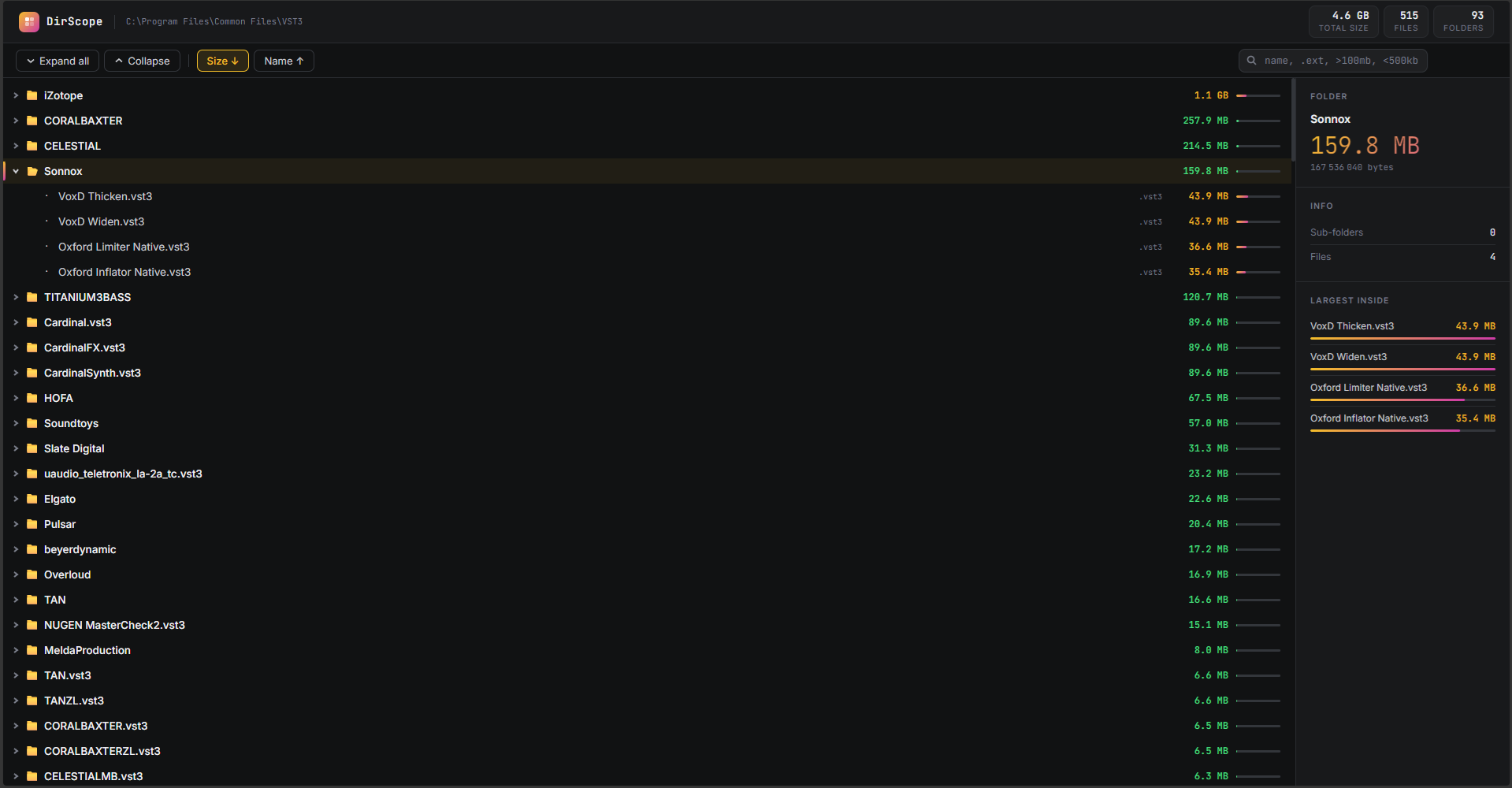
Batch tool for Windows users allowing you to see quickly and clearly which files/sub-folders/folders/filetypes are taking up space on your computer.
100% Free – No Account Required – No Ads – Runs Locally
Quick Start:
- Download and unzip the DirScope folder (contains 3 files)
- Drag any folder directly onto
DirScope.batfile and drop it — the scan starts immediately. - Your browser opens automatically with the report a few seconds later.
Frequently Asked
How do I run it?
Two ways. The fastest: drag any folder directly onto DirScope.bat and drop it — the scan starts immediately. Alternatively, double-click DirScope.bat, type or paste a folder path when prompted, and press Enter. Either way, your browser opens automatically with the report a few seconds later.
What does the installation look like?
There is no installation. DirScope is three plain files — DirScope.bat, DirScope_scan.ps1, and DirScope_template.html — that live in the same folder on your machine. Nothing is added to your system, no registry entries, no background processes. To uninstall, delete the folder.
How fast is the scan?
For most project folders (a few thousand files) the scan completes in under two seconds. Larger directories — say, 50 000 files — typically take 10–30 seconds depending on drive speed. SSDs are noticeably faster than HDDs for deep trees. The browser report itself is instant regardless of size, since the tree is built lazily as you expand folders.
Why is the output a webpage instead of a native app window?
A browser gives you a zero-dependency, cross-version UI with smooth rendering, keyboard shortcuts, and instant search — things that would require a full application framework to replicate natively. The HTML file is entirely self-contained and works offline. You can also bookmark it, share it with a colleague, or keep it as a snapshot record of a folder’s state at a point in time.
How does the search bar work?
Type anything and results filter live as you type — no Enter needed. You can search by name, by extension (.mp4, .psd, .zip), by size threshold (>500mb, <100kb, >2gb), or combine them (report .pdf >1mb). Matching items are highlighted in the tree, and parent folders stay visible so you always know where in the structure a result lives. Press Escape to clear the filter instantly.
Something went wrong — how do I debug it?
Every run writes a log file called DirScope_log.txt directly to your Desktop. It records each step of the scan with timestamps, so if something fails you can see exactly where and why. If you want to report a bug or improve the tool, the three source files are plain text and straightforward to read — the PowerShell script is under 85 lines and the HTML template is self-contained. You can nous contacter to share your bug report.
What is DirScope and what problem does it solve?
Windows gives you no easy way to understand why a folder is large. You end up right-clicking individual subfolders, waiting for Properties to load, and manually comparing numbers in your head. DirScope scans any folder in seconds and opens a clean, interactive report in your browser — every file and subfolder listed with its exact size, heat-coloured bars showing what’s eating the most space, and an instant search so you can drill down without clicking around blindly.
What are the system requirements?
Windows 7 or later, with PowerShell 5.1 (built into every modern Windows install) and any modern browser (Chrome, Edge, Firefox). No admin rights required. No internet connection required after the first load if your browser has cached the Google Fonts — and even without fonts it works fine.
How is TrackNotes different from SoundCloud comments or Notetracks?
Unlike SoundCloud, Notetracks, Samply, or Nugen Jotter, TrackNotes processes everything locally in your browser. There is no streaming, no cloud storage, no installation, and no subscription. Your audio — whether a rough mix, a master, or a stem — never touches an external server. This makes it suitable for NDA-protected sessions, unreleased music, and any workflow where confidentiality matters. It also means zero latency: playback starts instantly from the original file at full quality.
Does DirScope read or upload my files?
No. DirScope only reads file and folder metadata — names, sizes, extensions, and last-modified dates. It never opens file contents. Everything runs locally on your machine: the scan happens in PowerShell, the output is a self-contained HTML file written to your system’s Temp folder, and nothing is sent anywhere.
Is DirScope free? Are there any limits?
DirScope is completely free with no usage limits, no file size caps imposed by the tool, no watermarking, and no account required. This is the only, full featured version existing.